
ATS-Friendly Resume Format: The Layout Recruiters (and the Software) Actually Read
Most 'ATS-optimized' templates fail the one test that matters: can the software read them? Here's the exact format that parses cleanly — layout, headings, fonts, file type — and how to check yours.
Last updated: June 2026.
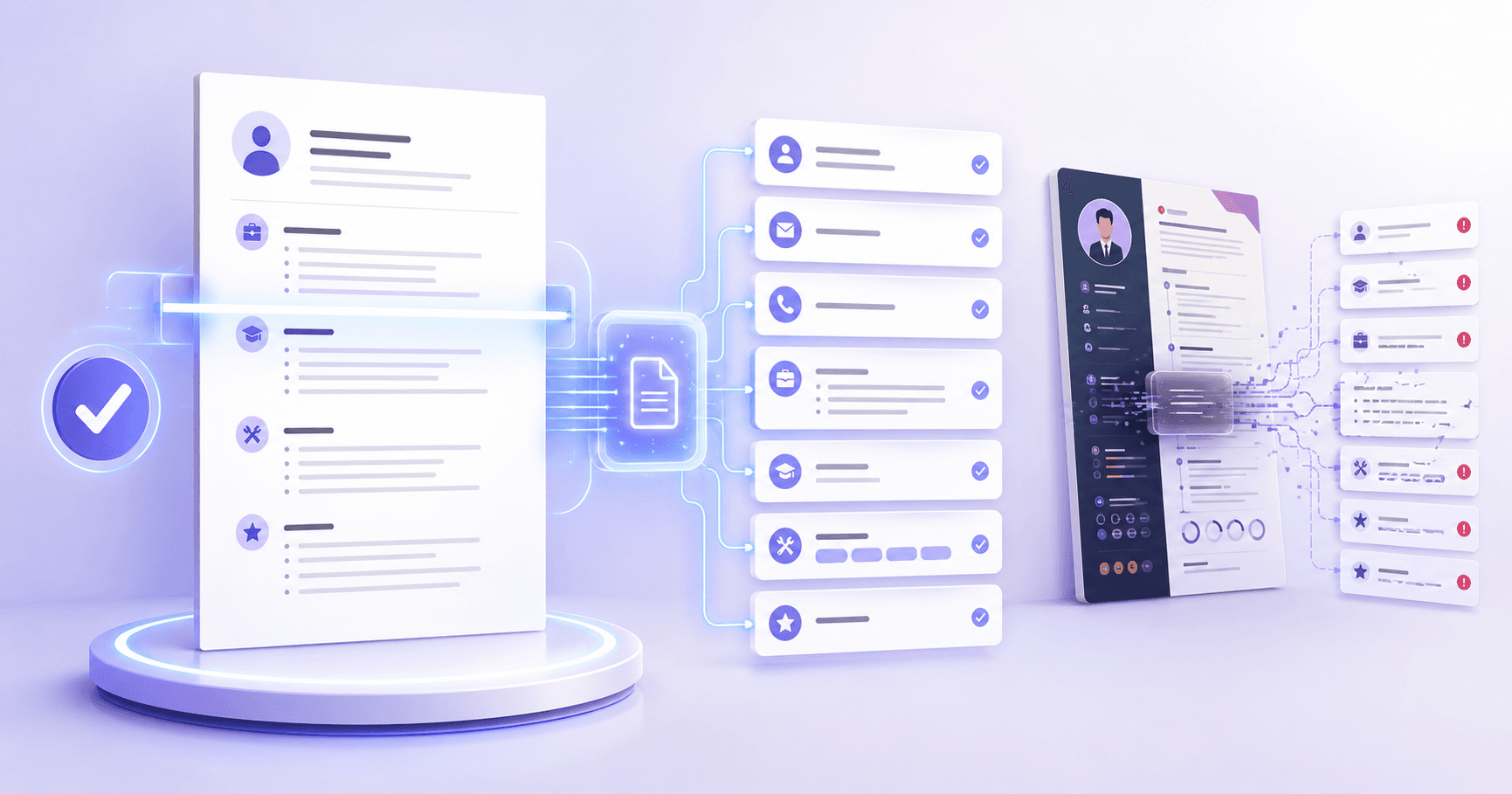
Quick answer: An ATS-friendly resume is single-column, uses standard section headings, simple bullets, a common font, and a text-based file (PDF by default). It avoids tables, columns, text boxes, graphics, and headers/footers — the things that scramble when software reads your resume as plain text. Format doesn't make your resume better; it decides whether your content is read correctly in the first place.
Here's the trap: the resume templates that look the most impressive are often the ones that fail. Sidebars, columns, icons, and clever layouts photograph well, but an applicant tracking system (ATS) parses your resume into plain text, and that's where the beautiful version falls apart. This is the format that survives.
What "ATS-Friendly" Actually Means
It means parse-able. When you submit, the software converts your resume into structured fields — name, work history, skills — so a recruiter can search and sort. If your layout confuses that conversion, your strongest experience can land in the wrong field or vanish. (For how parsing and ranking fit together, see Will My Resume Pass ATS?.)
So "ATS-friendly format" is not a style. It's whether the machine can read you cleanly. Everything below serves that one goal.
The Format Rules That Matter
| Element | Use this ✅ | Avoid this ❌ | Why |
|---|---|---|---|
| Layout | Single column | Two columns, sidebars | Parsers read left-to-right and interleave columns into nonsense |
| Sections | "Experience," "Education," "Skills" | Creative/renamed headers | The software looks for standard headings to map fields |
| Structure | Simple bullet points | Tables, text boxes, shapes | These scramble or get dropped entirely |
| Visuals | Text only | Icons, graphics, photos, charts | Images carry no parse-able text |
| Header/footer | Key info in the body | Name/contact in the header or footer | Many parsers skip headers and footers |
| Font | Arial, Calibri, Georgia, Times | Decorative, condensed, unusual | Odd fonts render and parse poorly |
| Emphasis | Real bold | Images of text, all-caps blocks | Image text is invisible to the parser |
| File | Text-based PDF (or .docx if asked) | Scanned/image PDF | An image PDF can't be read at all |
If your resume breaks more than one of these, the content quality almost doesn't matter — the software is reading a garbled version.
The File-Type Question (PDF vs Word)
This gets over-debated. For almost every modern ATS, a text-based PDF is safe and keeps your layout intact across devices, so it's the right default. Use .docx only when the posting explicitly asks for Word. The only file that reliably fails is a scanned or image-only PDF (for example, a printout you photographed) because there's no text to read — just pixels.
The bigger format risk isn't the file extension at all; it's the layout inside it. A two-column PDF and a two-column Word doc fail for the same reason. Fix the layout first, then the file type is a footnote.
Templates Recruiters Actually Read
Search "ATS resume template" and most results are exactly what not to use: two-column designs with skill bars, icons, and a colored sidebar. They're built to look impressive in a preview, not to parse.
A genuinely ATS-friendly template is unglamorous on purpose:
- One column, top to bottom.
- A short summary, then Experience, Education, Skills.
- Plain bullets, a standard font, real bold for emphasis.
- Your name and contact in the body, not the header.
The good news: a clean single-column resume reads better to a busy human too. You lose nothing by dropping the sidebar, and you stop fighting the parser. Boring and readable beats beautiful and broken.
How to Test Your Format in 30 Seconds
You don't need special tools to check parsing. Do the copy-paste test: select all of your resume, copy it, and paste into a plain text editor. Read it top to bottom — is the order logical, are titles and dates intact, is anything scrambled? If the plain text is clean, the software can read it. If it's a mess, your formatting is the problem, and the table above tells you which element to fix.
For a precise read — parsing plus keyword match and content quality against a target role — score your resume with PokeBot's resume analysis. Create a free account, upload your resume, and Resume Studio flags exactly what's breaking and how to fix it.
Check your resume free — get your 0–100 score →
The Bottom Line
ATS-friendly formatting isn't about gaming the software — it's about not tripping it. Go single-column, use standard headings and a common font, keep it text-based, and skip the tables and graphics. Then your real content gets read the way you wrote it. For the broader picture of why resumes get filtered, start with Is My Resume Good? 12 Signs and 5 resume mistakes that get you filtered.
Frequently Asked Questions
What is an ATS-friendly resume format?
A single-column layout with standard section headings (Experience, Education, Skills), simple bullet points, a common font, and a text-based file. It avoids anything the parser can scramble: tables, multiple columns, text boxes, graphics, icons, and information hidden in headers or footers. The goal is that the software reads your content in the right order and the right fields.
Is a PDF or Word resume better for ATS?
A text-based PDF is the safe default for almost every modern applicant tracking system, and it preserves your formatting across devices. Submit a .docx only when the application specifically asks for Word. The one file that always fails is a scanned or image-only PDF, which the software can't read at all.
Are resume templates ATS-friendly?
Many aren't. The most visually impressive templates use multiple columns, sidebars, tables, and graphics precisely the elements that break parsing. A template is ATS-friendly only if it's single-column with standard headings and plain text. Boring and readable beats beautiful and broken.
What font should I use for an ATS resume?
A common, clean font: Arial, Calibri, Helvetica, Georgia, or Times New Roman. Avoid decorative, condensed, or unusual fonts, which can render or parse poorly. Keep body text around 10 to 12 points, and use real bold rather than images of text for emphasis.
Can an ATS read a two-column resume?
Often not correctly. Many parsers read left to right across the whole page, so a two-column layout gets interleaved into nonsense, mixing your skills sidebar into your job descriptions. If you love the two-column look, keep a single-column version for every actual application.
How do I check if my resume format is ATS-friendly?
Do the copy-paste test: select all of your resume, paste it into a plain text editor, and read it top to bottom. If the order is logical and nothing is scrambled, the software can read it. For a precise read on parsing plus keyword and content quality, score it with an AI resume analysis.