
Meet the PokeBot.ai Career Coach GPT in the GPT Store
A free career coach in ChatGPT's GPT Store, built on PokeBot's 2026 interview bank. No account needed. How to use it and how it differs from the Plugin.
Last updated: July 2026.
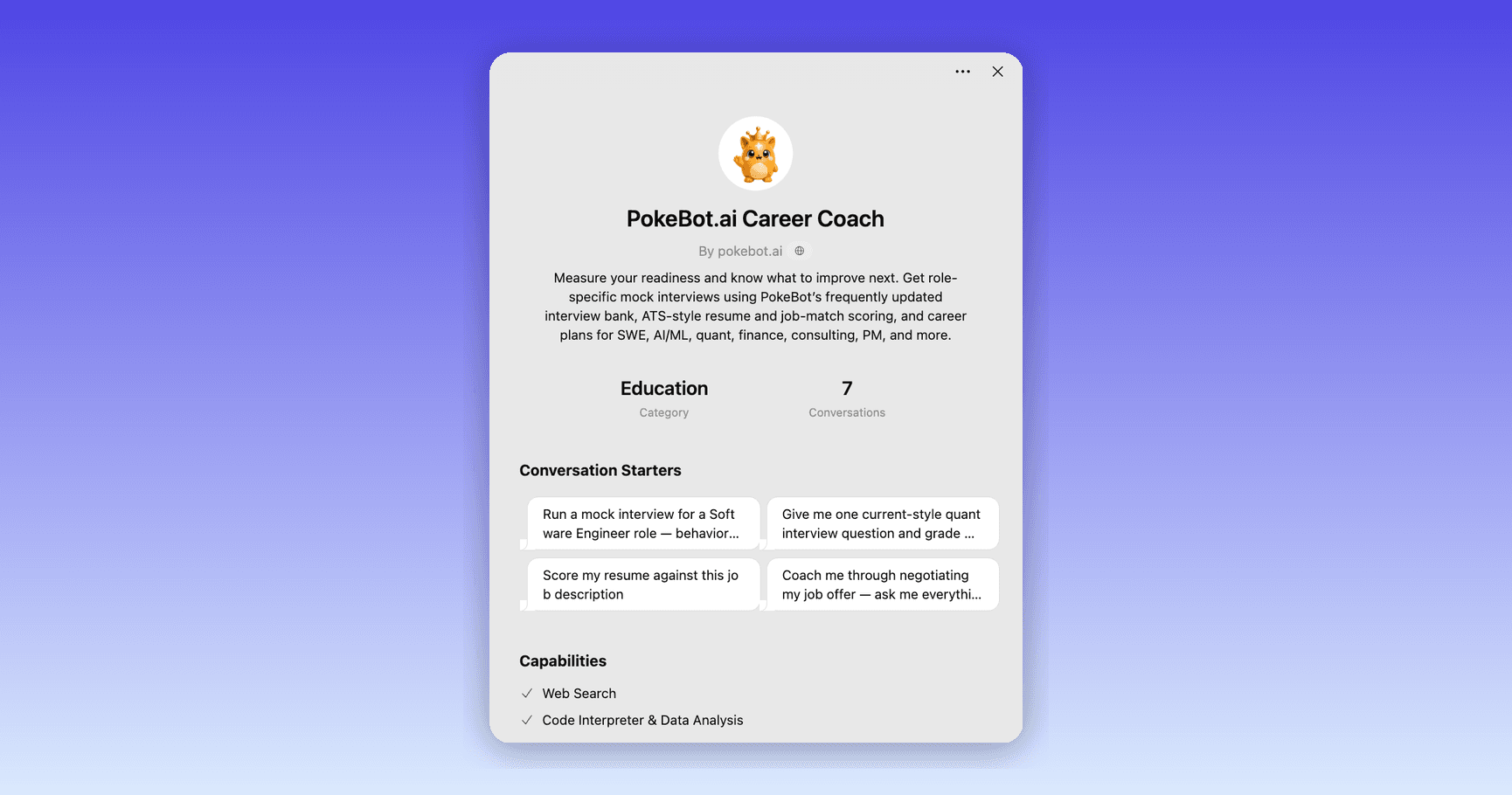
Quick answer: The PokeBot.ai Career Coach GPT is now live in ChatGPT's GPT Store. It's a conversational career coach for mock interviews, resume feedback, salary negotiation, and career planning, built on PokeBot's curated 2026 interview question bank and our coaching methods. Open the PokeBot.ai Career Coach GPT (or search "PokeBot.ai Career Coach" in the GPT Store) and start talking. It's free, and you don't need an account or any setup.
We recently brought PokeBot's live tools into ChatGPT as a Plugin, which you install and then call with @ in a chat. Today we're adding a second, lighter way to use PokeBot inside ChatGPT: a GPT you can just talk to.
What is the PokeBot.ai Career Coach GPT?
It's a custom GPT: a version of ChatGPT set up with PokeBot's knowledge and coaching approach. It carries our current-style interview question banks (161 questions across quant, SWE, data science, AI/ML, finance, and product management), our career-ladder and resume playbooks, and coaching instructions that tell it to ask for more depth when an answer is thin and to skip generic praise.
There are no forms or buttons to work through. You talk to it the way you would in any ChatGPT chat. Ask it to run a mock interview and it asks one question at a time, waits for your answer, grades it against a rubric, and pushes you to go deeper. Ask it to review a pitch for your resume and it will, using the same standards our platform uses.
How do I find and use it?
- Open ChatGPT and go to the GPT Store at chatgpt.com/gpts.
- Search PokeBot.ai Career Coach and open it (published by pokebot.ai, in the Education category), or open it directly.
- Tap one of the conversation starters, or just type what you need, for example, "Give me one current-style quant interview question and grade my answer."
It works on ChatGPT web, desktop, and mobile, and it remembers the thread of your conversation as you go.
What can it help with?
- Mock interviews: role-specific questions with feedback on each answer, and follow-ups that probe where your answer was thin.
- Resume and cover-letter coaching: how to sharpen bullets, quantify impact, and tailor to a target role.
- Salary negotiation: scripts for what to say and how to handle equity, so you get more than "just be confident."
- Career planning: 30/60/90-day plans and guidance on the next step up your role's career ladder.
It also has web search and a code interpreter turned on, so it can look up current salary data or work through a quant problem step by step.
How do the GPT, Plugin, and full app differ?
You can now use PokeBot in three places. All three draw on the same PokeBot knowledge, but each does a different job:
| PokeBot GPT (GPT Store) | PokeBot Plugin (in ChatGPT) | Full app (app.pokebot.ai) | |
|---|---|---|---|
| What it is | A conversational coach | Live tools inside ChatGPT | The complete career platform |
| How it feels | Pure chat, no forms | Chat with visual result cards | A tailored web app |
| Scores | Rubric-guided coaching (ChatGPT's assessment) | Numeric scores computed by PokeBot's engine, in a visual scorecard | The full scoring engine plus history and trends |
| Resume | Coaching and feedback | Scored analysis card | Generate & download a tailored, ATS-ready resume |
| Best for | Open-ended practice and talking things through | A quick, scored, visual check | Running a complete preparation campaign |
| Memory | The current conversation | The current conversation | Your whole journey: saved results, history, progress |
| Account | None needed | None needed | Free account to save and track |
In short, the GPT is a coach you chat with, and the Plugin shows you scored cards. The full platform saves your progress over time, and it's where you can generate and download a tailored, ATS-ready resume, run voice interviews, use the improve-and-re-score loop, track your progress, and use the Opportunity Map for warm introductions.
Why are there two PokeBot options in ChatGPT?
Some people want to talk a problem through without filling in forms or attaching files, and the GPT is built for that. Others want a scored, visual analysis they can screenshot and act on, which is what the PokeBot Plugin gives them. With both available, you can pick whichever suits what you're doing, and both link to the full platform when you want to save your progress.
Try it today: open the PokeBot.ai Career Coach GPT, or, when you want scored results and saved progress, start a free readiness check on the web.
Frequently Asked Questions
How do I find the PokeBot.ai Career Coach GPT?
Open it directly at https://chatgpt.com/g/g-6a591f4c2f7c8191adeea0a0872da35e-pokebot-ai-career-coach, or go to the GPT Store (chatgpt.com/gpts), search for 'PokeBot.ai Career Coach', and start a conversation. You don't need to install anything or create a PokeBot account.
Is the PokeBot.ai Career Coach GPT free?
Yes. Anyone with ChatGPT access can use the GPT for free. It works only through conversation, and there's nothing to buy inside it.
What's the difference between the PokeBot GPT and the PokeBot Plugin in ChatGPT?
They're two separate products with similar names. The GPT (in the GPT Store) is a coach you chat with, built on PokeBot's curated interview bank and career knowledge, with no forms to fill in. The PokeBot Plugin (in the Plugins directory) is something you install and then call with @ in a chat. It connects to PokeBot's live scoring engine and shows visual scorecards with numeric scores. Use the GPT for open-ended coaching and practice, and the Plugin when you want a scored, visual analysis.
Where do the interview questions come from?
The GPT draws on PokeBot's question banks, including a current-style set of 161 questions that reflects how technical interviews are run in 2024-2026 across quant, software engineering, data science, AI/ML, finance, and product management.
Does the GPT give me a real PokeBot resume score?
No. The GPT coaches you in conversation using PokeBot's rubrics and methods, so any score it gives you is ChatGPT's own assessment guided by our approach. PokeBot's live scoring engine is not involved. For a score from that engine, with a visual scorecard, use the PokeBot Plugin in ChatGPT or the full platform at app.pokebot.ai.
Does the GPT remember my past sessions?
It remembers the thread of your current conversation, but not across separate chats. To keep your results, score history, and progress over time, use the full platform at app.pokebot.ai.
Do I need a PokeBot account to use the GPT?
No. The GPT works entirely without an account. When you're ready to track progress, save results, and run scored analyses, create a free account at app.pokebot.ai.